

Late entries give organisers a simple way to fill spare start slots, increase participation and revenue, and do so without creating additional administration or uncertainty.
The feature is entirely controlled by the event organiser and is disabled by default for all Open events. If enabled, the system handles the full late entry process automatically - including payment, start number allocation and rider notifications - with no additional administration required from the organiser.
Organisers can choose to enable late entries either before or after publishing the start sheet, allowing flexibility in how and when remaining places are offered without impacting the normal pre-closing-date entry process.
1. Overview: what has changed?
Previously, online entries closed completely at the published closing date.
This gave organisers time to prepare and publish the start sheet.
The new functionality introduces an optional late entry phase after the normal closing date.
Late entries are:
Optional
Fully automated
Controlled entirely by the organiser
If enabled, late entries allow organisers to fill remaining gaps on a published start sheet without any manual administration.
2. Key principles
Late entries are disabled by default for all Open events.
Organisers decide:
whether late entries are allowed
how many late entries are available
the closing date and time for late entries up until 15 minutes before event start time
whether a different entry fee applies
whether to advertise late entries before or after start sheet publication
Late entries are online only.
The system handles:
entry acceptance
payment
start number allocation
rider notification
There is no additional admin work for the organiser.
Enabling late entries does not change how or when organisers are paid for regular entries.
3. How the late entry process works
Before the normal closing date
Riders can enter as normal.
Late entries may be enabled or disabled but do not need to be visible to riders until after Start Sheet publication.
After the normal closing date
Online entries pause while the organiser prepares the start sheet.
Once the start sheet is published
If late entries are enabled:
Available slots open on a first come, first served basis.
Entries remain open until the late entry deadline is reached or late entry allowance is met
4. How start numbers are allocated for late entries
Late entrants are automatically allocated a start number and time.
Numbers are filled into pre-existing gaps in the published start sheet.
Gaps are filled:
starting with the highest available gap before the final rider working backwards towards the start.
for example, if an event has 60 regular entries and gaps at positions 50, 40, 30, 20, 10, 5, 4, 3, 2 and 1, and 10 late entries are allowed, those gaps will be filled in that order as riders enter.
Once gaps are filled as just described, additional late entries will be added to the end of the start sheet in ascending order until the late entry limit is reached.
5. Payment and confirmation for late entrants
When a rider selects Enter, their place is held for 10 minutes to allow payment.
On successful payment:
the rider is allocated a start number immediately
they receive an automatic confirmation email
the email includes the published start sheet
If payment is not completed within 10 minutes:
the slot is released back to the pool
6. Setting up late entries (step-by-step)
Late entries may be configured at any time during the event's life cycle. The screens are different depending on the status of the event
6.1 Enabling late entry settings for a Draft event
Draft Event Submission is explained in the Add New section of this help article
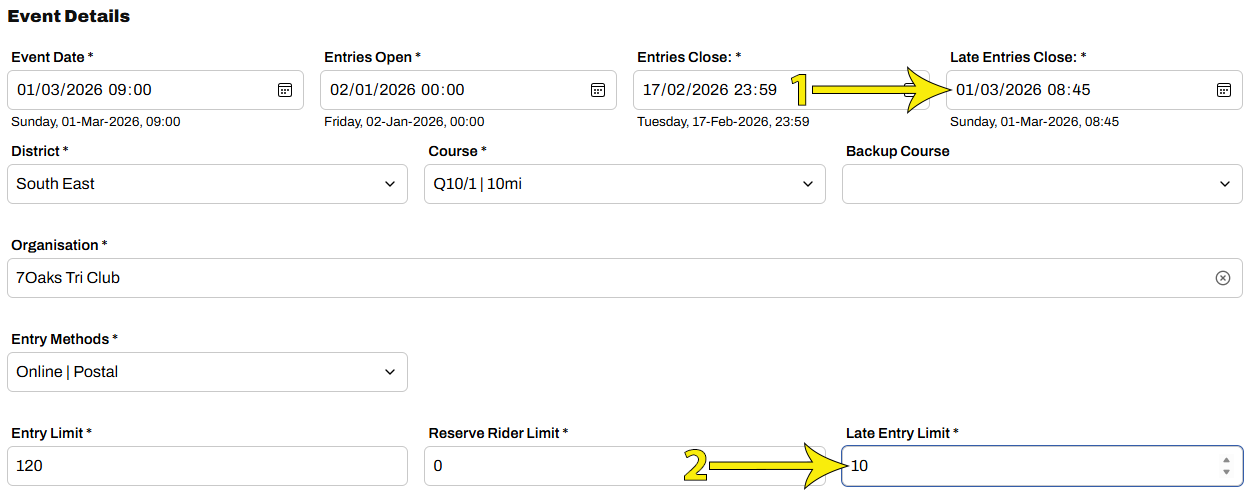
The relevant settings are Late Entries Close date, Late Entry Limit and Late Entry Fee
By default, all Open events are created with a Late Entries Close date / time of 15 minutes before the event start time (arrow 1 below), however this is only relevant when the Late Entry Limit is set (arrow 2) and may otherwise be ignored. The Late Entries Close date may be changed but cannot be less than 15 minutes before start time. Note: when setting the cut-off organisers should consider the practical issues of ensuring that all race personnel, especially timekeepers, are aware of any late entrants.
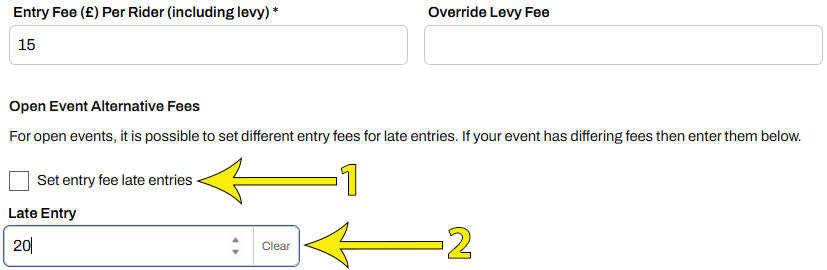
Optionally set a different fee for late entries: Scroll down and select Set entry fee late entries (arrow 1 below) to expose the late entry fee box (arrow 2)
6.2 Enabling late entry settings for an Approved event
Editing an Approved Open event is explained in this help article
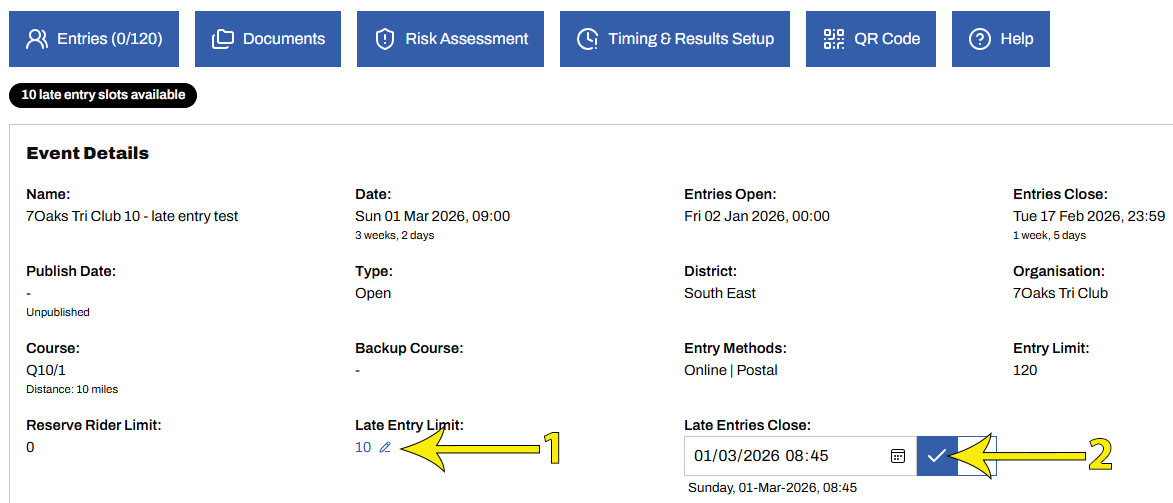
From the event edit screen, any value displaying a pencil icon may be edited by clicking it as shown for the Late Entry Limit (arrow 1 below). Once edited, select the ✔ to confirm as shown for Late Entry Close date (arrow 2).
By default, all events have a Late Entries Close date of 15 minutes before the event start time, however this is only relevant when the Late Entry Limit is set and may otherwise be ignored. The Late Entries Close date may be changed but cannot be less than 15 minutes before start time.
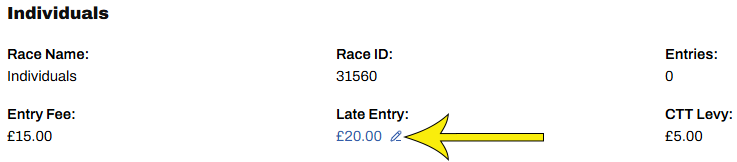
Scroll down to (optionally) set a different fee for late entries
7. Controlling visibility before and after start sheet publication
For riders, access to late entries depends on when configured by the event organiser and whether the start sheet has been published.
Late entries may be configured before or after Start Sheet publication.
Late entries configured after Start Sheet Publication
Organisers wanting to encourage riders to enter before the normal closing date should use this option.
Riders will view the event as a regular event and have of no expectation of late entry
Late entries configured before Closing Date
For organisers happy to advertise late entries in advance, late entries may be configured at event submission or any time before Closing Date.
While the event is Open for Entry, riders enter in the usual way. The option to enter after Start Sheet publication is visible to riders as shown below.
Before Closing Date riders will pay the regular fee
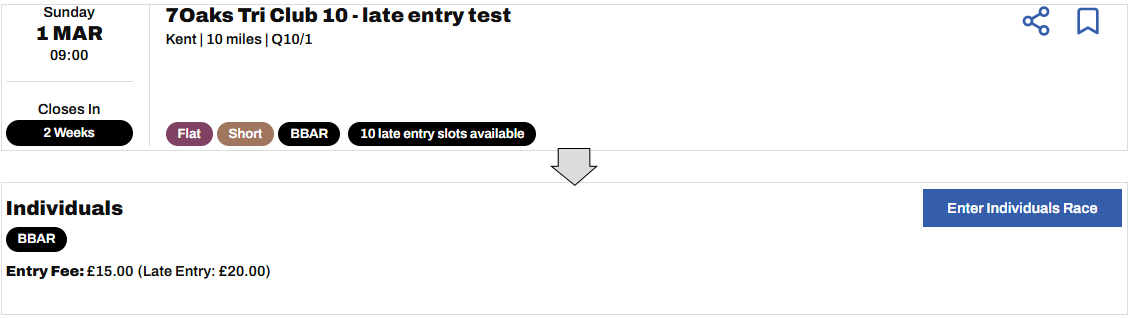
After Closing Date but before Start Sheet publication riders will not be able to enter the event
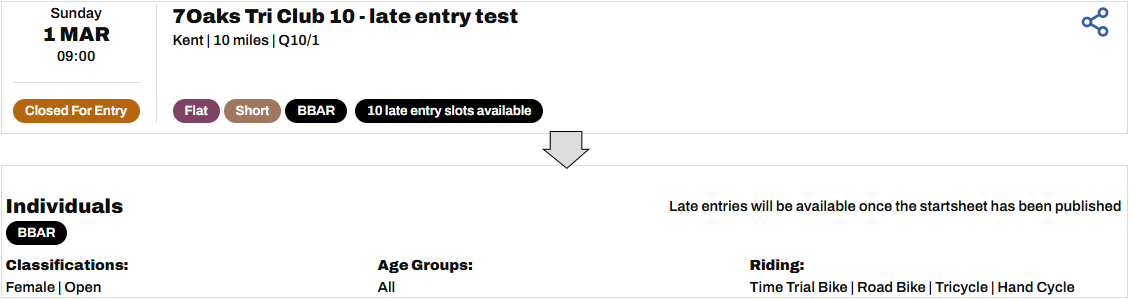
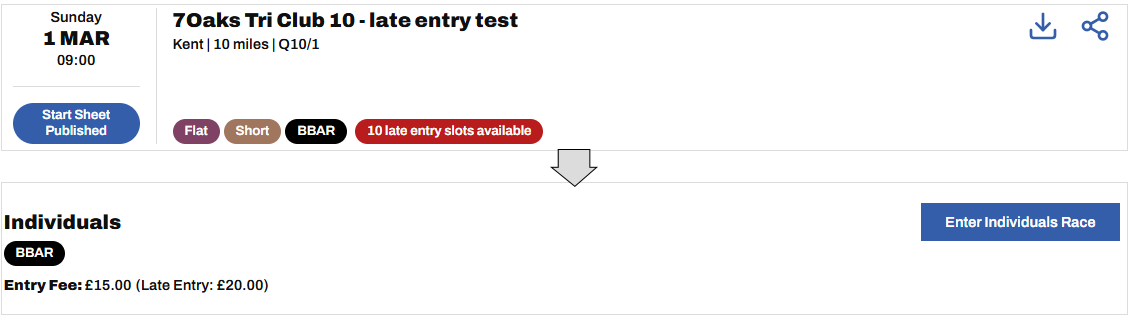
After start Sheet Publication
If not already set prior to closing date, late entries may be configured now.
Riders may enter and will pay the Late Entry fee
8. Important limitations and exclusions
Late entries are only available for individual events
Not available for:
tandem events
team events
Late entries are online only
Paper entries and cash entries are not supported
9. Financial settlement
Organisers are paid for regular entries on start sheet publication, as now.
Late entry fees are automatically paid out once the late entry closing date has passed.
No manual reconciliation required.